How to do this exercise
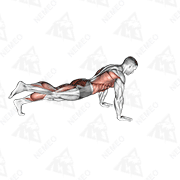
- Step:1 Start in a high plank position with your hands directly under your shoulders and your body in a straight line from head to toe.
- Step:2 Engage your core and squeeze your glutes to maintain a stable position.
- Step:3 Lower your body down onto your forearms, one arm at a time, maintaining a straight line from head to toe.
- Step:4 Hold this position for the desired amount of time, keeping your core and glutes engaged.
- Step:5 To return to the starting position, push through your forearms and lift your body back up into a high plank position.
- Step:6 Repeat for the desired number of repetitions.
Turn this exercise into progress.
Track your sets, reps and weights with Nemeo and get recommendations for your next workout.
All exercises